Showing posts with label Troubleshooting. Show all posts

Thursday, 6 November 2014

Virtualbox: copy/paste between host-guest doesn't work (solved)

Solution (doesn't work):

Virtualbox copy/paste between host-guest doesn't work:
Settings-->Storage-->SATA Controller and 2. 'Solid-state drive' is checked

DIDN'T WORK


Solution #2:

Settings / General / Advanced:
   Shared Clipboard: Bidirectional
   Drag'n'Drop: Bidirectional

Thursday, 18 September 2014

Spring Security + @Async problem: (SecurityContextHolder is empty)


Problem: I annotated a method with @Async and @PreAuthorize so that is executed asynchronously and be secured.
But it seems the security context (SecurityContextHolder) is not populated (althouth user has authenticated).
This happens only if the method is annotated with @Async.

Solution: From SecurityContextHolder we can get e.g. the logged in username (e.g. check this). SecurityContextHolder is saved in
current thread [1]. When we spawn a new thread the current thread's SecurityContextHolder  (which is a ThreadLocals)
is not copied/inherited.

In order to inherit it do the following:

    <bean class="org.springframework.beans.factory.config.MethodInvokingFactoryBean">
        <property name="targetClass" value="org.springframework.security.core.context.SecurityContextHolder" />
        <property name="targetMethod" value="setStrategyName" />
        <property name="arguments">
            <list>
                <value>MODE_INHERITABLETHREADLOCAL</value>
            </list>
        </property>
    </bean>


All possible modes:
  • MODE_THREADLOCAL (default strategy)
  • MODE_INHERITABLETHREADLOCAL: spawned threads inherit SecurityContext of the parent thread
  • MODE_THREADLOCAL
  • SYSTEM_PROPERTY

[1] From the Spring Reference: "By default the SecurityContextHolder uses a ThreadLocal to store these details, which means that the security context is always available to methods in the same thread of execution ..."

Monday, 25 August 2014

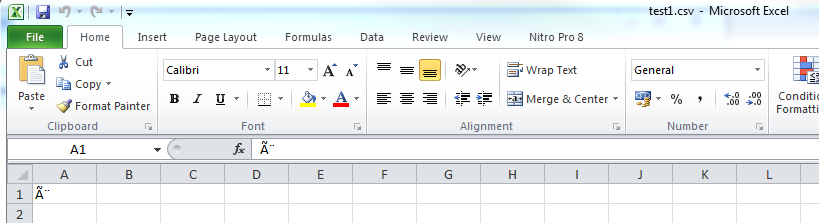
Excel doesn't render correctly UTF-8 characters when it opens CSVs


Scenario #1: I create a CSV in UTF-8 encoding with Java, save the character 'è'
but Excel doesn't render it well.


Scenario #2: I create a CSV in UTF-8 encoding with Notepad, save the character 'è'
and Excel renders it well.


Explanation (from Wikipedia)
"BOM use is optional, and, if used, should appear at the start of the text stream.
... the BOM character may also indicate which of the several Unicode representations
the text is encoded in."
"In UTF-16, a BOM (U+FEFF) may be placed as the first character of a file ... "       (Java is UTF-16)
 "The UTF-8 representation of the BOM is the byte sequence 0xEF,0xBB,0xBF." (Windows is UTF-8)
 "many pieces of software on Microsoft Windows such as Notepad will not correctly
 read UTF-8 text unless it has only ASCII characters or it starts with the BOM,
 and will add a BOM to the start when saving text as UTF-8"


 Therefore:
 => Scenario #1: notepad saves a CSV UTF-8 with the BOM U+EFBBBF therefore Excel opens it correctly
 => Scenario #2: but when the CSV UTF-8 is created with Java the Excel doesn't open it correctly

Demo on how to solve the problem on Scenario #1:
  Adding the prefix BOM U+EFBBBF on the CSV created programmatically


and now opening the CSV with excel  and it is correct!


Code solution for scenario #1 (creating CSV programmatically): add to generated CSV the
BOM suffix U+EFBBBF (for UTF-8 Operating Systems like Windows)

How to do it in Java
Java is UTF-16; therefore you have to write the UTF-16 BOM U+FEFF:

// BOM prefix U+FEFF for exported CSVs so that if the csv is openned with
// excel in UTF-8 OS (e.g. Windows) encoding is ok (e.g. char è)
char CSV_BOM = '\uFEFF';

writer.write(CSV_BOM); // writer is e.g. a BufferedWriter


Note: if you open the exported file with a hex editor like I did on the last image you will see the BOM U+EFBBBF.

Tuesday, 29 July 2014

MySQL error: Cannot delete or update a parent row: a foreign key constraint fails"

When trying to delete table foo(DROP TABLE foo1;) I got the following error:

Cannot delete or update a parent row: a foreign key constraint fails


As root execute the following to see what in what state is the db:

SHOW ENGINE INNODB STATUS;
------------------------
LATEST FOREIGN KEY ERROR
------------------------
140729 23:16:08  Cannot drop table `mydb`.`foo1`
because it is referenced by `mydb`.`foo2`


This tells us that table foo2 has fk to foo1. So remove the fk in foo2 (set it to null) or drop foo2 (this was the case for me since foo2 was empty -- db was in an inconsistent state).

Aspose.Words problem with fonts (encoding)

Summary
When using Aspose.Words in order to produce a pdf I had problem with some characters not renderer properly (e.g. ȗ) --  see the attached image where the created PDF does not render properly the character ȗ and it has embedded the Gentium fonts. The problem was that fonts were missing from my Operating System and the default fronts that Aspose.Words uses in this case don't support all the characters.


More Info
Aspose.Words when creates PDF uses True Type fonts. If it doesn't find True Type fonts it uses Gentium font; actually it embeds the fonts in the PDF (see the attached image). Gentium font doesn't support ȗ.

Therefore make sure that you have intalled on your Operating system True Type fonts. The algorithm that Aspose looks for fonts is the following (from here):
  1. Aspose.Words tries to find a font on the file system with an exact font name match.
  2. Next, Aspose.Words tries to find the required font among the fonts embedded in the original document. Some document formats such as DOCX can contain embedded fonts
  3. If Aspose.Words cannot find a font with the exact name match, it will attempt to to use the default font specified under FontSettings.DefaultFontName. If the user has not chosen their own default font then "Times New Roman" is the selected default font that is used. See the How to Set the Default Font used when Rendering topic for further information on setting default font.
  4. If Aspose.Words is unable to locate the font defined under FontSettings.DefaultFontName, it attempts to select the most suitable font from all of the available fonts.
  5. Finally, if Aspose.Words cannot find any fonts on the file system, it renders the document using the free Gentium font that is embedded into the Aspose.Words assembly.


Programmatically setting the fonts path has worked for me:


import com.aspose.words.FolderFontSource;


final String pathToFonts = "PATH TO TRUE TYPE FONTS";

FolderFontSource folderFontSource = new FolderFontSource(pathToFonts, true);
fontSources.add(folderFontSource);
FontSourceBase[] f
ontSourceBase = (FontSourceBase[])fontSources.toArray(new FontSourceBase[fontSources.size()]);
FontSettings.setFontsSources(
fontSourceBase);


Default font locations for various Operating Systems

Unix (Linux, Solaris)
/usr/share/fonts
/usr/local/share/fonts
/usr/X11R6/lib/X11/fonts 

Windows
Start | Run --> Fonts

Sunday, 8 September 2013

Android: cannot connect to phone (permission denied )

Solution: restart adb daemon as root:
$ sudo -i
# cd $ANDROID_SDK/sdk/platform-tools
# ./adb kill-server
# ./adb start-server
* daemon not running. starting it now on port 5037 *
* daemon started successfully *

Tuesday, 12 February 2013

Java troubleshooting: Unsupported major.minor version ##.#

While running a Main-class I got "Unsupported major.minor version 52.0". The problem that I compiled (javac) with JDK 1.8 but I run (java) the code with the older JRE 1.7.
$ javac -version
javac 1.8.0-ea
$ java -version
java version "1.7.0_13"
Java(TM) SE Runtime Environment (build 1.7.0_13-b20)
Java HotSpot(TM) 64-Bit Server VM (build 23.7-b01, mixed mode)
The solution is to use the same JRE and JDK version:
$ sudo update-alternatives --config javac
[sudo] password for micharg: 
There are 3 choices for the alternative javac (providing /usr/bin/javac).

  Selection    Path                                  Priority   Status
------------------------------------------------------------
* 0            /usr/lib/jvm/java-8-oracle/bin/javac   15        auto mode
  1            /usr/lib/jvm/java-6-oracle/bin/javac   12        manual mode
  2            /usr/lib/jvm/java-7-oracle/bin/javac   13        manual mode
  3            /usr/lib/jvm/java-8-oracle/bin/javac   15        manual mode

Press enter to keep the current choice[*], or type selection number: 2

Sunday, 30 December 2012

Android troubleshooting: "Conversion to Dalvik format failed ..."

I included all my libraries (and android-support-v*.jar) into libs.. Eclipse recognized them as "Android Dependencies". THIS IS WRONG. The error was saying me that I have included multiple times the same files. I think that Eclipse includes in the final apk the contents of libs/*.jar and the "Android Dependencies".

In order to fix the error you have right click the project, go to Java Build Path, Libraries, remove Android Dependences and include your jars with the button "Add JARs..."


Eclipse GUI freezes...

soution: increase vm memory...I have seen great improvement!!
Edit eclipse.ini and set:
-vmargs
-Xms1024m
-Xmx2048m


Tuesday, 25 December 2012

Eclipse debugging ...

$ eclipse -debug -console -clean

See the logs in the workspace: .metadata/.log

Monday, 24 December 2012

Sunday, 23 December 2012

Git troubleshooting: "fatal: branch - not something we can merge"

Am I in master or in a branch?
$ git branch 
* (no branch)
  master

Merge branch with master (unsuccessfully):
$ git merge  branch
fatal: branch - not something we can merge

Read what a detached head ["* (no branch)"] is ... Solution:
$ git branch tmp
$ git checkout master
$ git merge tmp

Troubleshooting: Android error in Eclipse: No Launcher activity found!

Error in Eclipse:
No Launcher activity found!
The launch will only sync the application package on the device!

The only solution for after trying EVERYTHING was setting my main activity specifically and not automatically:
Run > Run Configurations ... > Launch > selecting here the main activity of my app

Friday, 24 February 2012

JSF: Changes made to submitted value by the Managed Bean are not rendered after ajax call and using immediate="true"

The goal and problem

In a facet form I have a value. When I click the commandButton it calls an action on the Managed Bean which changes the submitted value. The updated value should be rendered on the view...but it doesn't! Note that I use immediate="true" to skip the validation phase (because validation error may be shown).
[Actually what I want to do is render some numerical values and randomize them each time I click the commandButton] Managed Bean Foo.java:
public void submit() {
   this.val = 3; //the new value
}
Facelet:
<h:form>
<p:inputText value="#{fooBean.val}"></p:inputText>

<p:commandButton value="Submit"
  action="#{fooBean.submit()}" 
  update="@form"
  immediate="true" />
</h:form>

The solution

Skipping validation doesn't mean that the input value is not submitted!! In the Managed Bean I change the value foobean.val and indeed changes but the component p:inputText preserves the old value because its attribute submittedValue is the old one. The solution is to use the attribute process="@this" because this way we don't submit the value!. The correct Facelet is the following:
<h:form>
<p:inputText value="#{fooBean.val}"></p:inputText>

<p:commandButton value="Submit"
  action="#{fooBean.submit()}" 
  update="@form"
  immediate="true"
  process="@this" />
</h:form>

Wednesday, 22 February 2012

Problem using greek (unicode) locale in a BIRT report design

The goal

I wanted to use greek locale in a BIRT report design; i.e. foo.rptdesign:
...
<property name="locale">el</property>
...

The problem

Error when opening pdf with acroread (evince doesn't properly shows greek fonts but english fonts are ok!): The Traditional Chinese Language Support Package is required to display this page properly. Under the current configuration, this resource is not available. You can download it from http://www.adobe.com/go/acroasianfontpack On console I get the following output:
org.eclipse.birt.report.engine.layout.pdf.font.FontMappingManagerFactory$2 run
register fonts in /usr/openwin/lib/locale/ja/X11/fonts/TT cost:0ms
org.eclipse.birt.report.engine.layout.pdf.font.FontMappingManagerFactory$2 run
register fonts in /usr/openwin/lib/locale/iso_8859_13/X11/fonts/TrueType cost:0ms
org.eclipse.birt.report.engine.layout.pdf.font.FontMappingManagerFactory$2 run
register fonts in /usr/openwin/lib/locale/ru.ansi-1251/X11/fonts/TrueType cost:0ms
...
register fonts in /usr/share/fonts/zh_CN/TrueType cost:0ms
...
register fonts in /usr/X11R6/lib/X11/fonts/OTF cost:0ms
...
I.e. BIRT registers the following paths to scan for the fonts:
  • /user/openwin/lib/locale/
  • /usr/share/fonts/
  • etc

The Solution

When I installed the Microsoft True Type Core Font for the Web everything the greek (unicode) fonts were fine:
$ sudo apt-get install ttf-mscorefonts-installer
The fonts are installed in /usr/share/fonts/truetype/msttcorefonts/ Hint:If you use BIRT in Tomcat (or another server) restart server after the ttf-mscorefonts-installer installation!

Thursday, 16 February 2012

jQuery: what if another javascript library uses $?

Background: jQuery uses $() as an alias to the function jQuery().

The problem:What if another library uses the same character? (e.g. Prototype; other libraries???)

Solution:Make jQuery not use to ${} by calling $.noConflict()

Code taken from jQuery.noConflict():
<script type="text/javascript">
  $.noConflict();
  // Code that uses other library's $ can follow here.
</script>

References

PrimeFaces: How to style (css) a menu in an accordionPanel

Tested with PrimeFaces 3.1

Before (with default css)

<p:accordionPanel>  
 <p:tab title="Foo tab title">  
  <p:menu>  
    <p:menuitem value="Foo menu item title" url="#" />
  </p:menu>
  </p:tab>
</p:accordionPanel>
Result:

After (with overriden css)

Just add the class "accordionMenu" to the accordionPanel:
<p:accordionPanel styleClass="accordionMenu">  
 <p:tab title="Foo tab title">  
  <p:menu>  
    <p:menuitem value="Foo menu item title" url="#" />
  </p:menu>
  </p:tab>
</p:accordionPanel>
.accordionMenu .ui-menu {
 width:100% !important; 
 
}
.accordionMenu .ui-accordion-content {
 padding:0 !important;
 overflow:inherit !important;
}

.accordionMenu .ui-helper-clearfix:after {
 height:inherit !important;
}
Result:

Wednesday, 15 February 2012

JSF: How to bind a Double to and format it (or: How to tackle "java.lang.Long cannot be cast to java.lang.Double")

The problem:If the inputText is bound to a Double and an integer value is given (e.g. 100) then a java.lang.Long cannot be cast to java.lang.Double exception is thrown.

The solution (hint):The solution is at the end of the post..

Goal 1: Bind the Double attribute value of the ManagedBean fooBean into a inputText

<p:inputText value="#{fooBean.value}" />
OK the above works fine.

Goal 2: Add formatting

<p:inputText value="#{fooBean.value}">
  <f:convertNumber maxFractionDigits="2" type="number"/>
</p:inputText>
But...if I give as input a number without a decimal part (e.g. 100) a coversion exceptions is thrown: java.lang.Long cannot be cast to java.lang.Double. The reason for this exception is described in stack overflow Phill's post:

After some investigation (see e.g. here, here and here) that <f:convertNumber> is the problem. It seems that the number it converts to is dependent on the input you give it - it could be an integer or a floating point number. In other words, it doesn't look at the target type - it just generates an instance of java.lang.Number. Which is hardly ideal, although I can't determine whether this is because somewhere I'm using an old version of JSF or EL or something like that. Proposals from the internet:

  • Add converterId="javax.faces.Double" into ...But: accepts and validates doubles but formatting doesn't work! (see )

Solution

In a few words..Formating works only if the value is bound to a BigDecimal! Double doesn't work :(
<p:inputText value="#{fooBean.value}" style="width:50px">
  <f:validateDoubleRange />
  <f:convertNumber maxFractionDigits="2" type="number"/>
</p:inputText>

References of people tackling the same problem